

Build and customize a MINI by choosing the body style, drivetrain, trim, style, exterior details, cabin, and essential technology. However, current stock and production limits can change which combinations remain open.
Therefore, the strongest configuration starts with major needs. Paint, wheels, and roof colors come later. Passenger access, cargo shape, drivetrain, and required technology should guide the first choices.
How Do You Start Building a MINI?
Building a MINI starts with the body style and drivetrain that suit planned passengers, cargo, and travel. Each early choice narrows the selections that follow.
The Cooper 2 Door keeps the smallest body within the current lineup. Therefore, it may suit drivers who value compact dimensions and front seat focus.
The Cooper 4 Door adds rear doors while keeping a tidy exterior. In addition, rear access becomes easier for passengers, child seats, or daily bags.
The Countryman provides a larger cabin and broader cargo area. Consequently, it may fit households carrying more people, luggage, pets, or sporting gear.
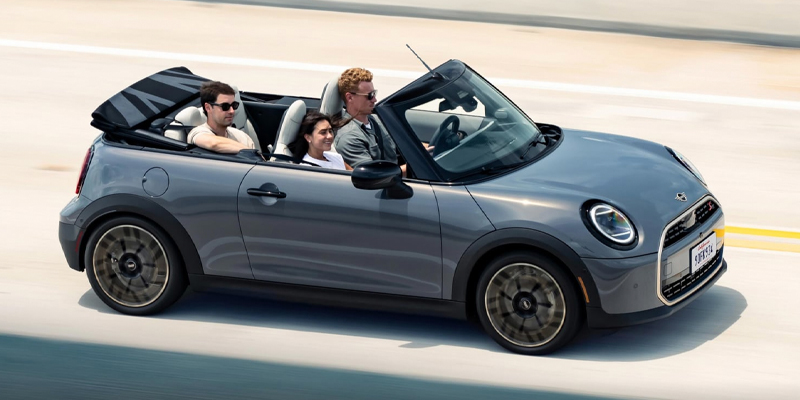
The Convertible adds a folding fabric roof. However, its roof structure changes rear access and enclosed storage. Those points deserve review before color selection begins.
After selecting the body style, choose the drivetrain version. Cooper, Cooper S, electric, ALL4, and John Cooper Works choices follow separate paths.
Use this order during the first configuration session:
- Choose the MINI body style that supports regular passenger and cargo needs.
- Select the drivetrain version that matches planned travel and charging access.
- Review the trim groups that contain required cabin and technology items.
- Choose a visual style after the equipment group is clear.
- Select paint, roof, wheels, upholstery, and cabin finishes last.
This sequence keeps major needs ahead of decorative choices. It also makes current inventory comparison easier later.
Readers can begin with the MINI model research page before opening the builder.
Understand MINI Trims and Styles
MINI trim levels group technology and comfort equipment. MINI styles shape much of the cabin and exterior appearance.
Therefore, trim and style should not be treated as the same choice. One controls grouped equipment. The other guides materials, colors, dashboard details, and selected exterior accents.
Current MINI research may show Signature, Signature Plus, or Iconic trim names. However, exact trim names can change by model year and model.
A higher trim may add items such as upgraded audio, driver assistance, parking technology, or cabin comfort features. Therefore, compare the included equipment line by line.
Styles may include Classic, Favoured, John Cooper Works, or another current theme. The selected style may change upholstery, dashboard trim, wheels, and exterior details.
Which choice controls the cabin look? Style usually carries much of the visual direction. However, trim still controls many equipment items.
For this reason, begin with a list of required technology. Then, select the style that gives the cabin its preferred color and texture.
A useful comparison note can separate choices into two groups:
- Required items can include cameras, parking support, audio, seat features, or driver assistance.
- Visual preferences can include paint, roof color, wheel design, upholstery, and dashboard finish.
Keeping those groups separate prevents a favorite cabin theme from hiding a missing feature.
Select Paint Roof Wheels and Cabin Details
Exterior and cabin choices give each MINI its visual character. However, every paint, roof, wheel, and upholstery combination may not pair together.
The body color comes first within the visual stage. After that, the builder may show roof and mirror cap choices that match the selected model.
Some Cooper models offer contrasting roof colors. The Convertible uses a fabric roof, so its selection follows another path.
Wheel choices can also change after a trim or style selection. In addition, wheel size can change tire profile and road feel.
Larger wheels may create a stronger visual presence. However, shorter tire sidewalls can transmit more road texture into the cabin.
Therefore, wheel selection should include more than appearance. Review regular road surfaces, tire replacement needs, and preferred ride response.
Inside, upholstery and dashboard finishes shape the main color story. Headliner choices may also appear on selected configurations.
Can every exterior and cabin combination be paired together? No. A paint color, roof, style, or trim may remove another choice.
For this reason, save several acceptable color combinations. That approach creates more room when matching current Jacksonville inventory.
The MINI Cooper 2 Door page offers a closer look at current cabin and display details.
Review Technology and Essential Features
Technology review should happen before the configuration is treated as complete. A strong color combination cannot replace a missing daily feature.
Start with the circular central display and its menu layout. Then, review phone connection, navigation, camera views, parking support, audio, and climate controls.
In addition, compare seat features, steering wheel controls, charging ports, and driver assistance items. Exact equipment can change across trims and stock units.
Which features must appear in the final MINI? The answer should come from regular travel.
A Jacksonville commuter may place parking cameras and phone connection near the top. A household carrying children may focus on rear access and climate control.
An electric Countryman shopper may place charging information and route planning first. A Convertible shopper may focus on roof operation and cabin wind control.
Create a short list before checking inventory:
- Mark three features that must appear in the selected MINI.
- Mark three appearance choices that can change.
- Record the preferred model, drivetrain, trim, and style.
- Note one acceptable alternate paint and wheel combination.
- Save the configuration details before leaving the builder.
Therefore, a close inventory match can still work when one flexible visual choice changes. The essential items remain protected.
Readers considering a sport focused version can review MINI John Cooper Works models separately.
How Do You Match a MINI Build With Inventory?
A MINI build matches inventory by comparing essential choices before flexible appearance details. Start with the body style, drivetrain, trim, and required technology.
Next, open the new MINI inventory. Filter by model and review each listing against the saved configuration.
Inventory turns quickly, so a listing may change before the visit. Therefore, confirm current availability with Tom Bush MINI before making travel plans.
When the exact build is unavailable, compare nearby matches. One vehicle may use another roof color but include every required cabin feature.
Another MINI may match the exterior while missing a required trim item. In that case, appearance should not override the equipment list.
Which choices can change for a close match? Paint, wheels, upholstery, or dashboard trim may offer room. Body style, drivetrain, and required technology may remain firm.
Furthermore, ask whether another incoming MINI closely matches the saved build. Current production and allocation information must be confirmed through the dealership.
Readers can also compare the MINI Cooper 4 Door, MINI Countryman, and MINI Cooper Convertible.
Factory configuration should remain separate from later accessory shopping. Accessories can add storage, protection, or visual details after delivery.
However, they should not replace careful model, drivetrain, trim, and technology selection before purchase.
Build and customize a MINI by placing major travel needs first. Then, let paint, roof, wheels, and cabin details bring the final choice to life.
Connect with us


